Log inLog inStartStart

Browse

  • Modules→
  • Projects

    • Projects→
    • Kanban and Gantt→
    • WBS and risks→
    • OKRs and portfolio→

    Communication

    • Chat with Fay→
    • Meetings with AI minutes→
    • Events→

    Knowledge

    • Documents and office suite→
    • Docs, sheets and slides→
    • Whiteboards→
    • Forms→

    Time

    • Calendar→
    • Timesheets and capacity→
    • Automations→

    Sales and money

    • CRM→
    • Finance→
    • Reports→

    More

    • All features→
    • AI Module→
    • Integrations→
    • Try it free→
  • By industry

    • Law firms→
    • Agencies→
    • Associations→
    • Consulting firms→
    • Accounting→
    • Engineering→
    • All solutions→

    Featured

    • AI Module→
    • 7-day free trial→
  • Features→
  • Pricing→
  • Português
  • ·
  • English
  • ·
  • Español
Explore the FAYOL modulesExplore the FAYOL modulesExplore the FAYOL modulesExplore the FAYOL modules

The meeting happens inside the system, and comes out as minutes.

The video room is FAYOL's own: AI writes down who spoke and hands back finished minutes, with the decisions and who does what.
See pricingSee pricingGet startedGet started
Meetings
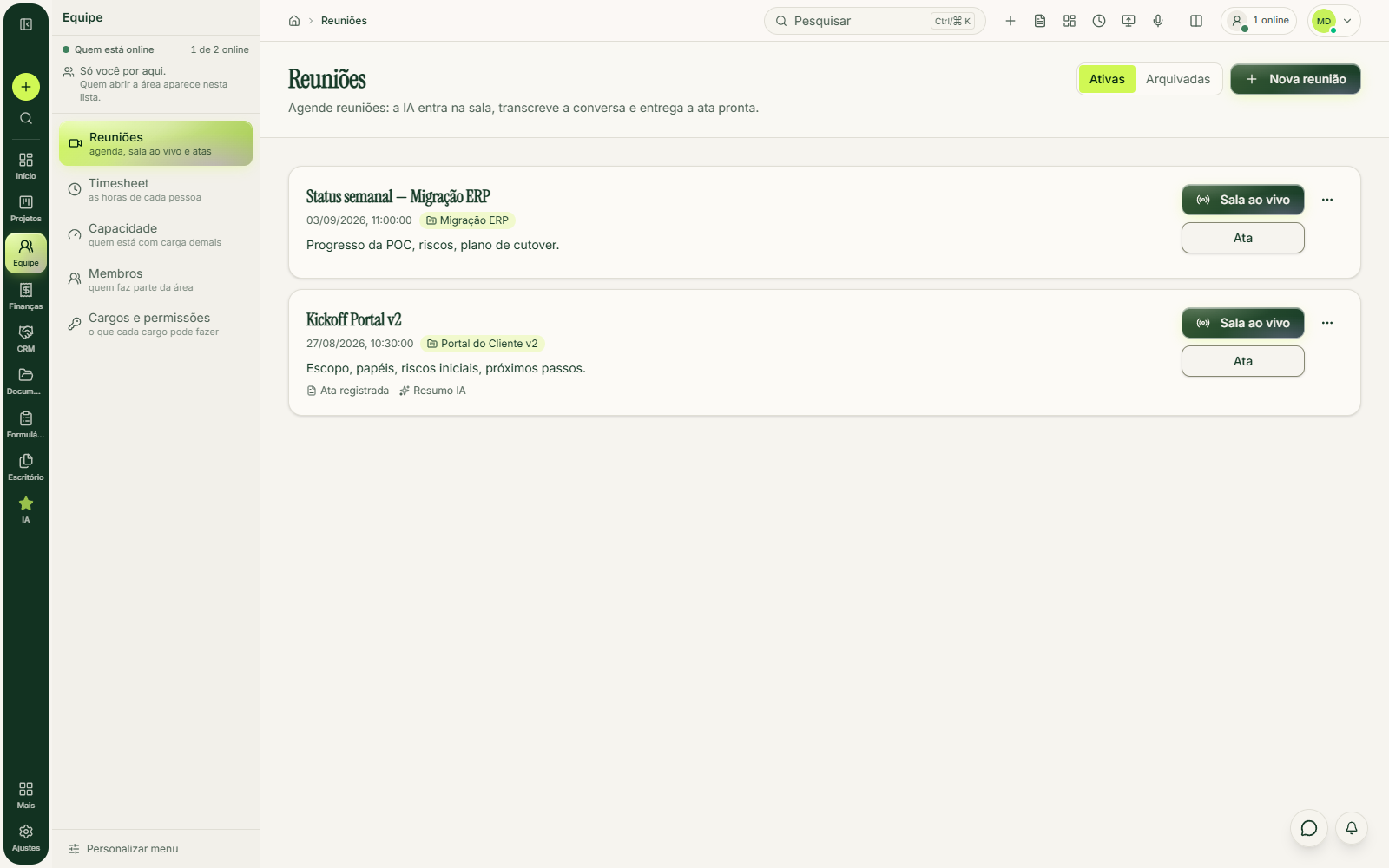
FAYOL Meetings screen: two scheduled meetings with agendas, live room and minutes buttons, and the “Minutes recorded” and “AI summary” tags

From invite to minutes, in four steps

Open each step: where AI comes in, it says so.
  1. Date, time and a written agenda: the team reads it before joining.

  2. One click on “Live room” and everyone is in.

  3. AI writes down the conversation, saying who spoke. The chat comes along too, on the same timeline.

  4. The minutes arrive as a draft to review, and each action comes with an owner, deadline and priority.

The room is FAYOL's own

Hover over (or tap) a row to see the detail.
  • One click on “Live room” brings the whole team in.

  • When it's full, whoever tries to join next sees “room full”.

  • To invite a client, you add them to the team: they join from the browser, without a plan of their own.

  • What gets saved is text: the transcript and the minutes.

  • The “Minutes recorded” and “AI summary” tags show what's already done. You can copy the minutes or download the file and send it to the client.

What comes with the plan and what AI adds

The Meetings module comes with the Pro and Scale plans; AI is an add-on you turn on whenever you want.

Meetings Module

Included in the Pro and Scale plans.

  • Video room in the browser, with camera, microphone and screen
  • Room chat and who's present
  • Schedule with agenda and meeting history
  • Minutes to fill in by hand, with a ready-made template

AI Module: R$ 249.90/month

A separate add-on the workspace owner subscribes to.

  • Live transcript showing who spoke
  • Minutes written by AI, as a draft for you to review
  • Next steps with owner, deadline and priority
  • Covers the whole team, including guests without a plan

One fixed monthly price for the whole team. Each plan's modules are on Pricing and the add-on on AI Module.

The same meeting, with and without minutes

Drag the divider: the left side is the meeting everyone has already had.
How it is today

The meeting nobody took notes on

  • ×The agenda was stuck in an email and the talk went wherever it wanted
  • ×Whoever had a free hand took notes, and wrote down what they understood
  • ×Decisions become memories, and everyone remembers their own
  • ×The next week starts with “where did we leave off?”
With FAYOL

The meeting that comes out as minutes

  • ✓Agenda written beforehand, in the meeting, visible to the team
  • ✓The conversation becomes text with the name of whoever spoke
  • ✓Minutes with the decisions and what's still pending
  • ✓Each action with an owner and deadline, checked when you save
From agenda to minutes without leaving the systemFrom agenda to minutes without leaving the systemFrom agenda to minutes without leaving the systemFrom agenda to minutes without leaving the systemFrom agenda to minutes without leaving the systemFrom agenda to minutes without leaving the system

Before you schedule your first one

The video room, chat, schedule with agenda, history and the minutes to fill in by hand: all in the Pro and Scale plans. The AI Module (R$ 249.90/month) adds the transcript with names, minutes written by AI and ready-made next steps.
No: AI hands back a draft and nothing goes into the meeting until someone reviews and saves it. The system rejects a next step with no owner or with a past deadline.
Yes. The subscription belongs to the workspace owner and covers the whole team, including guests without a plan of their own.

Your next meeting can end with the minutes ready.

The room is in the Pro and Scale plans; AI minutes come with the AI Module, R$ 249.90/month. Try it for 7 days with no card.

I have an accountI have an accountGet startedGet started

Method is rhythm. Rhythm is delivery.

The Brazilian platform where deadlines, costs and your team live in one place, and the next decision is always obvious.

contato@gestaofayol.com.br
Meta Tech Provider

Product

  • All features
  • Projects and schedules
  • Meetings with minutes
  • Automations
  • Reports
  • Finance
  • AI Module

Solutions

  • Agencies
  • Engineering and construction
  • Consulting and PMO
  • Law firms
  • Accounting
  • Associations
  • See all

Company

  • Pricing
  • Terms
  • Privacy
Log inLog inStart todayStart today
  • TermsTerms
  • PrivacyPrivacy
  • Português
  • ·
  • English
  • ·
  • Español

© 2026 FAYOL

contato@gestaofayol.com.brcontato@gestaofayol.com.br

CNPJ 66.122.758/0001-00Legal name 66.122.758 Daniel Pavao BassottoGRUPO NIMA